The Wildland Fire Equipment Operators Fix Kit
Built for wildland fire equipment operators and water tender contractors.
If you run a dozer, engine, or water tender on federal wildfire incidents under an OF-286, the government is grading its own homework: a camp timekeeper hand-posts your invoice from your own signed shift tickets, and a blank standby column, an equipment class posted one tier low, or a dropped demobilization line all leak your pay with nobody checking but you. This kit finds where the money leaks in your own work and gives you the steps and the words to close each one.
Opens secure checkout. Instant download after payment. 30 days to ask for a refund — refund policy · terms
The 7 leaks it covers
5 you can close it · 1 the other side owes it · 1 a pro decides
- Equipment posted a class/type below your agreement, so a lower rate is paidWhere to look first: Pull three papers: your equipment agreement, your resource order (dispatch), and the OF-286 invoice.Keep it from coming back: Carry your agreement page at check-in. Check the type on every invoice before you sign, and write any mismatch in Block 22 (Remarks) first.You can close it
- Demob travel (the drive home) left off the OF-286 invoiceWhere to look first: Pull your equipment agreement and find the travel terms: how travel to and from the incident is paid (for example mileage, or a mobilization amount), and whether the trip home is covered.Keep it from coming back: Before you leave the incident, write down your release time and ask how the return trip will be added. Check every invoice for it before you sign, and write anything missing in Block 22 (Remarks) first.You can close it
- Second operational period dropped because the second operator isn't carried throughWhere to look first: For every day you ran two shifts, pull the OF-297 shift tickets and check that each shift names its own operator and times.Keep it from coming back: On every double-shift day, get a separate signed ticket for each operator, with names and times, before you leave the line. Write any missing shift in Block 22 (Remarks) before you sign the invoice.You can close it
- Integrity boundary: never certify hours, class, standby or shifts you can't proveWhere to look first: Before you sign any shift ticket or invoice, check every line against what actually happened that day: hours, equipment type, Work or Special, number of shifts and operators.Keep it from coming back: Sign only for lines you can tie to a signed ticket. Check every invoice against your tickets before you sign.You can close it
- Standby/special-rate periods left blank or posted wrong on the invoiceWhere to look first: Pull your signed OF-297 shift tickets and the OF-286 invoice for the incident.Keep it from coming back: Check each ticket before you sign it, and check the invoice against your tickets before you sign it. Anything wrong goes in Block 22 (Remarks) before your signature.You can close it
- Late federal payment paid without Prompt Payment Act interestWhere to look first: For each incident invoice, write down three dates: the day you signed it, the day the government receiving officer signed it, and the day the money hit your account.Keep it from coming back: Keep your signed copy of every invoice with both signature dates. When a payment is slow, check it for an interest line or notice.The other side owes it
- Self-employment tax not set aside from incident paymentsWhere to look first: Incident payments to your business come with nothing held back for tax - including self-employment tax, which is on top of income tax.Keep it from coming back: Move the set-aside the day each incident payment lands, and keep the quarterly dates on your calendar a couple of weeks ahead of fire season.A pro decides
Free: one full leak from this kit
No sign-up, no email. Here is leak 1 of 7 exactly as it appears in the kit, so you can see what you get before you buy.
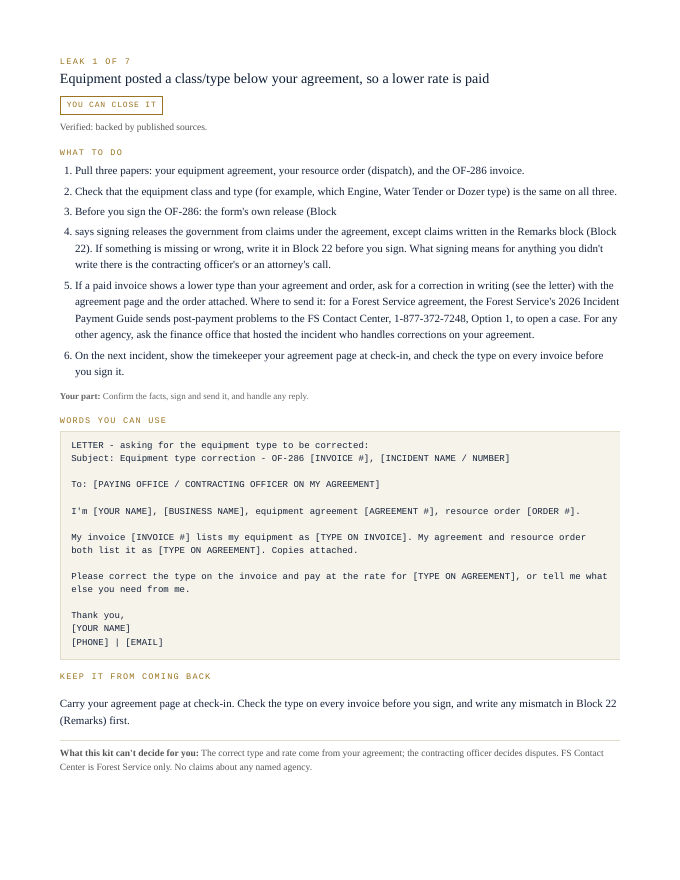
Equipment posted a class/type below your agreement, so a lower rate is paid
You can close it- Pull three papers: your equipment agreement, your resource order (dispatch), and the OF-286 invoice.
- Check that the equipment class and type (for example, which Engine, Water Tender or Dozer type) is the same on all three.
- Before you sign the OF-286: the form's own release (Block
- says signing releases the government from claims under the agreement, except claims written in the Remarks block (Block 22). If something is missing or wrong, write it in Block 22 before you sign. What signing means for anything you didn't write there is the contracting officer's or an attorney's call.
- If a paid invoice shows a lower type than your agreement and order, ask for a correction in writing (see the letter) with the agreement page and the order attached. Where to send it: for a Forest Service agreement, the Forest Service's 2026 Incident Payment Guide sends post-payment problems to the FS Contact Center, 1-877-372-7248, Option 1, to open a case. For any other agency, ask the finance office that hosted the incident who handles corrections on your agreement.
- On the next incident, show the timekeeper your agreement page at check-in, and check the type on every invoice before you sign it.
Your part: Confirm the facts, sign and send it, and handle any reply.
LETTER - asking for the equipment type to be corrected:
Subject: Equipment type correction - OF-286 [INVOICE #], [INCIDENT NAME / NUMBER]

To: [PAYING OFFICE / CONTRACTING OFFICER ON MY AGREEMENT]

I'm [YOUR NAME], [BUSINESS NAME], equipment agreement [AGREEMENT #], resource order [ORDER #].

My invoice [INVOICE #] lists my equipment as [TYPE ON INVOICE]. My agreement and resource order both list it as [TYPE ON AGREEMENT]. Copies attached.

Please correct the type on the invoice and pay at the rate for [TYPE ON AGREEMENT], or tell me what else you need from me.

Thank you,
[YOUR NAME]
[PHONE] | [EMAIL]
Carry your agreement page at check-in. Check the type on every invoice before you sign, and write any mismatch in Block 22 (Remarks) first.
What this kit can't decide for you: The correct type and rate come from your agreement; the contracting officer decides disputes. FS Contact Center is Forest Service only. No claims about any named agency.
That's 1 of 7. The other 6 come the same way in the kit: steps, words to send, a habit to keep each one closed.
Opens secure checkout. Instant download after payment. 30 days to ask for a refund — refund policy · terms
What people in this work look up
When wildland fire equipment operators go looking for answers, they search things like “vipr contract”, “of-286” and “prompt payment act interest”. Those searches turn up forms, averages and other people's numbers. This kit starts from your own records instead: the 7 places money leaks in this work, where to look first and the words to send to close each one.
What you get for each leak
- Numbered steps to close each leak
- Your part, spelled out
- Words you can use: letters and scripts, ready to send (fill in the brackets)
- A habit that keeps each leak from coming back
- An honest line on what the kit can't decide for you
A page from the kit
Questions people ask
Is my equipment posted at the right class and type?
A class below your agreement pays a lower rate. The kit shows how to check.
Should demob travel be on the OF-286?
Yes, the drive home. The kit flags it.
Am I owed interest on late federal payment?
Under the Prompt Payment Act. The kit shows how to claim it.
What it can't decide for you
This kit works from your own records. It doesn't give legal, tax, licensing or financial advice, and it never tells you what to charge. Where a CPA, attorney, insurer or state board makes the call, the kit says so and gets your records ready for them.
15-page PDF · instant download after payment · Code VYR-KIT-EMBER-01
Opens secure checkout. Instant download after payment. 30 days to ask for a refund — refund policy · terms
Use Jobber or Housecall Pro? Run the free leak check — it reads your job export in your browser and shows the money leaks the software doesn't flag. Nothing is uploaded.