The UGC Creators Fix Kit
Built for UGC creators and content creators doing brand deals.
The ones who do well figured out early that a video isn't sold once — it's licensed. This kit finds where the money leaks in your own work and gives you the steps and the words to close each one.
Opens secure checkout. Instant download after payment. 30 days to ask for a refund — refund policy · terms
The 10 leaks it covers
5 you can close it · 2 the other side owes it · 3 a pro decides
- Content gear treated as personal spending, not a cost of the workWhere to look first: What gear you buy is your call — this is about counting it, not cutting it. List every piece of gear and software you bought for making content: camera or phone, lights, mic, editing software, props.Keep it from coming back: Log every gear or software purchase for content the day you buy it.You can close it
- Niche chosen by interest without checking what it pays per hourWhere to look first: List your last ten jobs: the niche (finance, beauty, pets...), the price, your total hours, revision rounds, and whether any job was killed after the work was done.Keep it from coming back: Track hours, revisions and outcome on every job by niche, and compare niches per hour.You can close it
- Retainer taken without dividing it out to a per-video rateWhere to look first: A retainer trades rate for steady income. That is a fair trade if you choose it — a leak only if you never ran the numbers.Keep it from coming back: Write the deliverable count and the rate for extras into every retainer, and divide it out every month.You can close it
- Per-video price never converted to a true hourly rateWhere to look first: On your next three videos, time everything from first concept to delivered file: pitching, scripting, filming, retakes, editing, revisions, uploading.Keep it from coming back: Time every job end to end, and price from your real hours.You can close it
- Revision rounds with no cap, each one unpaid laborWhere to look first: Look at your last few projects: how many revision rounds did you do, and were they all in the original price?Keep it from coming back: A revision cap and a per-round fee in every quote, every time.You can close it
- Marketplace commission — the net that lands vs the price the brand paysWhere to look first: For each marketplace you work through, open its own current fee page and screenshot it with today's date. Note who pays which fee — brand, creator, or both.Keep it from coming back: Screenshot the fee terms when you take each job, and price on what lands.The other side owes it
- Work delivered but payment held behind brand approval — or never paidWhere to look first: Before you start any job, read the platform's or brand's terms for when you get paid: on delivery, or only on approval? Is there a deadline for the brand to approve? What happens if they never do?Keep it from coming back: Know whether you are paid on delivery or on approval before you start, and put the payment date in writing.The other side owes it
- Brand payments spent before anything is set aside for taxWhere to look first: Brand payments arrive with nothing withheld, from many payers. The finding is simple: is anything being set aside, or not? Open a separate savings account used only for taxes.Keep it from coming back: Move your CPA's set share to the tax account the day each payment lands.A pro decides
- Usage rights left unpriced — no period on how long the brand can use the videoWhere to look first: The first question is HOW LONG the brand can use your video. Where and how (organic or paid ads) comes second. For every deal you have running, find the usage clause: how long, where, paid ads or organic, and what happens when it ends.Keep it from coming back: No deal without a written usage period and an extension price.A pro decides
- Edited video delivered at a raw-footage price because the brief was unclearWhere to look first: Put two separate lines on your rate card: raw footage, and fully edited (captions, cuts, music).Keep it from coming back: Never quote until the brief says raw or edited, in writing.A pro decides
Free: one full leak from this kit
No sign-up, no email. Here is leak 1 of 10 exactly as it appears in the kit, so you can see what you get before you buy.
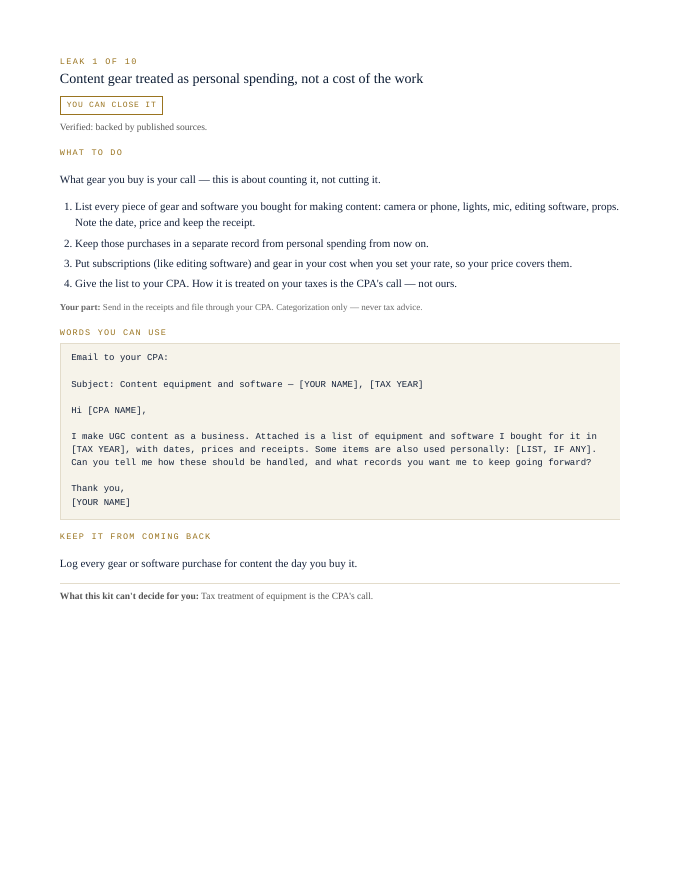
Content gear treated as personal spending, not a cost of the work
You can close itWhat gear you buy is your call — this is about counting it, not cutting it.
- List every piece of gear and software you bought for making content: camera or phone, lights, mic, editing software, props. Note the date, price and keep the receipt.
- Keep those purchases in a separate record from personal spending from now on.
- Put subscriptions (like editing software) and gear in your cost when you set your rate, so your price covers them.
- Give the list to your CPA. How it is treated on your taxes is the CPA's call — not ours.
Your part: Send in the receipts and file through your CPA. Categorization only — never tax advice.
Email to your CPA:

Subject: Content equipment and software — [YOUR NAME], [TAX YEAR]

Hi [CPA NAME],

I make UGC content as a business. Attached is a list of equipment and software I bought for it in [TAX YEAR], with dates, prices and receipts. Some items are also used personally: [LIST, IF ANY]. Can you tell me how these should be handled, and what records you want me to keep going forward?

Thank you,
[YOUR NAME]
Log every gear or software purchase for content the day you buy it.
What this kit can't decide for you: Tax treatment of equipment is the CPA's call.
That's 1 of 10. The other 9 come the same way in the kit: steps, words to send, a habit to keep each one closed.
Opens secure checkout. Instant download after payment. 30 days to ask for a refund — refund policy · terms
What people in this work look up
When UGC creators go looking for answers, they search things like “ugc contract”, “ugc creator”, “ugc rates” and “ugc pricing”. Those searches turn up forms, averages and other people's numbers. This kit starts from your own records instead: the 10 places money leaks in this work, where to look first and the words to send to close each one.
What you get for each leak
- Numbered steps to close each leak
- Your part, spelled out
- Words you can use: letters and scripts, ready to send (fill in the brackets)
- A habit that keeps each leak from coming back
- An honest line on what the kit can't decide for you
A page from the kit
Questions people ask
How much should I charge for UGC?
Turn each per-video price into a true hourly rate. The kit walks you through it.
Should usage rights cost extra?
Yes, with a period on how long the brand can use the video. The kit shows how.
How many revisions should I allow?
Cap them. Each uncapped round is unpaid labor. The kit gives you the words.
What it can't decide for you
This kit works from your own records. It doesn't give legal, tax, licensing or financial advice, and it never tells you what to charge. Where a CPA, attorney, insurer or state board makes the call, the kit says so and gets your records ready for them.
14-page PDF · instant download after payment · Code VYR-KIT-REMI-01
Opens secure checkout. Instant download after payment. 30 days to ask for a refund — refund policy · terms
Use Jobber or Housecall Pro? Run the free leak check — it reads your job export in your browser and shows the money leaks the software doesn't flag. Nothing is uploaded.