The Property Preservation Fix Kit
Built for property preservation and mortgage field service contractors.
The allowable schedule shows what the servicer can claim from the investor — not what you get paid, and not what it actually cost you to get there and do the work. This kit finds where the money leaks in your own work and gives you the steps and the words to close each one.
Opens secure checkout. Instant download after payment. 30 days to ask for a refund — refund policy · terms
The 7 leaks it covers
5 you can close it · 1 the other side owes it · 1 a pro decides
- Flat allowable on distant orders costs more than it paysWhere to look first: For each task type you do, track drive miles and time, on-site time, dump fees and materials for your next 10 orders.Keep it from coming back: Check distance against your floor before accepting. Review your coverage area every quarter.You can close it
- Photo fabrication boundary — never reuse or time-shift photosWhere to look first: This is a line, not a leak. Every photo you submit must be one you took, at that property, on that visit.Keep it from coming back: Shoot every photo on site, every visit. Keep originals untouched.You can close it
- Real per-order pay after tiers unknown until payment landsWhere to look first: For your last 20 paid orders, write down: what you were paid, miles driven, time on site, disposal and materials.Keep it from coming back: Check every order against your own floor before you accept it. Keep each company's fee schedule on file.You can close it
- Work done past the FHA cap or a line-item max without approvalWhere to look first: Before doing work that is above the normal allowable or not on the schedule, ask the company in writing whether approval is needed.Keep it from coming back: Never start over-allowable work without written approval on the order.You can close it
- Debris volume not photographed before haul-offWhere to look first: Before you load anything, photograph the debris from several angles with something for scale, with the date showing.Keep it from coming back: Shoot before photos with scale and date showing, every time, before anything is moved.You can close it
- Late invoices risk the servicer's 60-day reimbursement deadlineWhere to look first: Invoice every completed order the same day, with the full photo package.Keep it from coming back: Invoice the same day. Get each company's invoice deadline in writing.The other side owes it
- Self-employment tax not set aside on 1099 vendor incomeWhere to look first: Open a separate savings account for taxes. Move a set share of every payment into it the day it lands. Your CPA tells you what share.Keep it from coming back: Move the tax share the day each payment lands.A pro decides
Free: one full leak from this kit
No sign-up, no email. Here is leak 1 of 7 exactly as it appears in the kit, so you can see what you get before you buy.
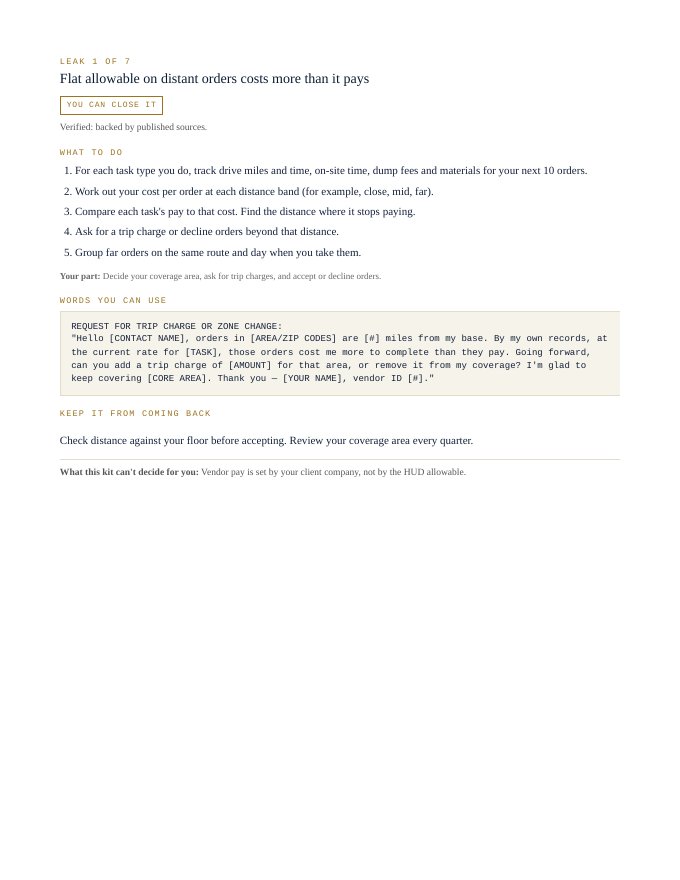
Flat allowable on distant orders costs more than it pays
You can close it- For each task type you do, track drive miles and time, on-site time, dump fees and materials for your next 10 orders.
- Work out your cost per order at each distance band (for example, close, mid, far).
- Compare each task's pay to that cost. Find the distance where it stops paying.
- Ask for a trip charge or decline orders beyond that distance.
- Group far orders on the same route and day when you take them.
Your part: Decide your coverage area, ask for trip charges, and accept or decline orders.
REQUEST FOR TRIP CHARGE OR ZONE CHANGE:
"Hello [CONTACT NAME], orders in [AREA/ZIP CODES] are [#] miles from my base. By my own records, at the current rate for [TASK], those orders cost me more to complete than they pay. Going forward, can you add a trip charge of [AMOUNT] for that area, or remove it from my coverage? I'm glad to keep covering [CORE AREA]. Thank you — [YOUR NAME], vendor ID [#]."
Check distance against your floor before accepting. Review your coverage area every quarter.
What this kit can't decide for you: Vendor pay is set by your client company, not by the HUD allowable.
That's 1 of 7. The other 6 come the same way in the kit: steps, words to send, a habit to keep each one closed.
Opens secure checkout. Instant download after payment. 30 days to ask for a refund — refund policy · terms
What people in this work look up
When property preservation and mortgage field service contractors go looking for answers, they search things like “property preservation insurance”, “winterization”, “property preservation”, “property preservation vendor” and “property preservation business”. Those searches turn up forms, averages and other people's numbers. This kit starts from your own records instead: the 7 places money leaks in this work, where to look first and the words to send to close each one.
What you get for each leak
- Numbered steps to close each leak
- Your part, spelled out
- Words you can use: letters and scripts, ready to send (fill in the brackets)
- A habit that keeps each leak from coming back
- An honest line on what the kit can't decide for you
A page from the kit
Questions people ask
Do distant work orders pay?
A flat allowable on far orders can cost more than it pays. The kit shows how to check.
What photos do I need for debris removal?
Photograph debris volume before haul-off. The kit shows the rule.
Can I go over the FHA cap?
Not without approval. The kit flags it.
What it can't decide for you
This kit works from your own records. It doesn't give legal, tax, licensing or financial advice, and it never tells you what to charge. Where a CPA, attorney, insurer or state board makes the call, the kit says so and gets your records ready for them.
11-page PDF · instant download after payment · Code VYR-KIT-STEWARD-01
Opens secure checkout. Instant download after payment. 30 days to ask for a refund — refund policy · terms
Use Jobber or Housecall Pro? Run the free leak check — it reads your job export in your browser and shows the money leaks the software doesn't flag. Nothing is uploaded.