The Military Service Members & Veterans Fix Kit
Built for military service members and veterans.
Military pay is accurate most of the time, and that is exactly why the errors slip by: nobody reads the LES until something is badly wrong. The money in this kit sits in places the system will not chase for you: an allowance coded to the wrong status, an interest rate you are allowed to cap, a tax exclusion that never made it to your W-2, a VA date you can lock in today. Each one starts with a document you already have.
Opens secure checkout. Instant download after payment. 30 days to ask for a refund — refund policy · terms
The 7 leaks it covers
2 you can close it · 3 the other side owes it · 2 a pro decides
- LES not read every month, so pay errors run for monthsWhere to look first: Pull your last three LES from myPay.Keep it from coming back: Read the LES the day it posts. Keep a copy of every status-change document with it.You can close it
- BAH coded to the wrong location or dependency statusWhere to look first: Find BAH on your LES and note the rate.Keep it from coming back: Re-check BAH after every PCS, promotion, marriage, divorce or new dependent.The other side owes it
- SCRA 6% interest cap never requested on debts from before serviceWhere to look first: List every loan or card you had before you went on active duty: car, credit cards, mortgage, student loans.Keep it from coming back: Send the request the week your orders arrive, for every pre-service account.The other side owes it
- Combat zone pay not excluded on the W-2Where to look first: List the months you were in a designated combat zone, even for one day.Keep it from coming back: After every deployment, check the first LES and the next W-2 for the exclusion.The other side owes it
- VA claim started late, losing months of back payWhere to look first: If you plan to file a VA disability claim and aren't ready yet, file an intent to file now: online, by phone, or VA Form 21-0966.Keep it from coming back: File the intent to file the day you decide to claim. Then the calendar runs for you, not against you.You can close it
- Guard and Reserve drill travel over 100 miles never deductedWhere to look first: If you are Guard or Reserve, list every drill or training trip where you traveled more than 100 miles from home (VERIFIED: see next step).Keep it from coming back: Log each drill trip the weekend you take it.A pro decides
- PCS move costs not reimbursed or deductedWhere to look first: Keep every receipt from your last PCS: shipping, storage, lodging, travel.Keep it from coming back: Start a move folder the day you get orders and drop every receipt in it.A pro decides
Free: one full leak from this kit
No sign-up, no email. Here is leak 1 of 7 exactly as it appears in the kit, so you can see what you get before you buy.
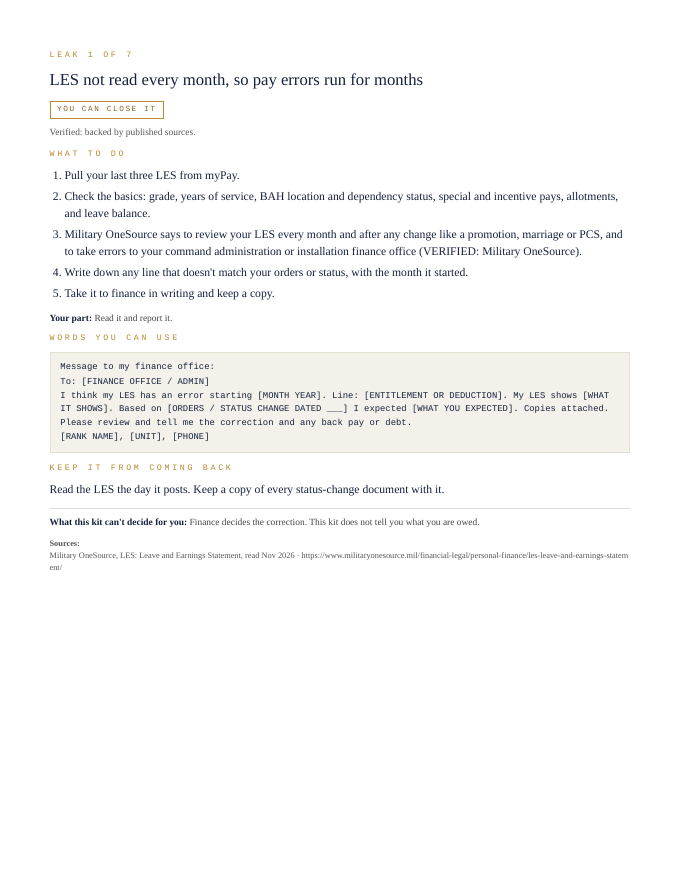
LES not read every month, so pay errors run for months
You can close it- Pull your last three LES from myPay.
- Check the basics: grade, years of service, BAH location and dependency status, special and incentive pays, allotments, and leave balance.
- Military OneSource says to review your LES every month and after any change like a promotion, marriage or PCS, and to take errors to your command administration or installation finance office (VERIFIED: Military OneSource).
- Write down any line that doesn't match your orders or status, with the month it started.
- Take it to finance in writing and keep a copy.
Your part: Read it and report it.
Message to my finance office:


To: [FINANCE OFFICE / ADMIN]
I think my LES has an error starting [MONTH YEAR]. Line: [ENTITLEMENT OR DEDUCTION]. My LES shows [WHAT IT SHOWS]. Based on [ORDERS / STATUS CHANGE DATED ___] I expected [WHAT YOU EXPECTED]. Copies attached. Please review and tell me the correction and any back pay or debt.
[RANK NAME], [UNIT], [PHONE]
Read the LES the day it posts. Keep a copy of every status-change document with it.
What this kit can't decide for you: Finance decides the correction. This kit does not tell you what you are owed.
That's 1 of 7. The other 6 come the same way in the kit: steps, words to send, a habit to keep each one closed.
Opens secure checkout. Instant download after payment. 30 days to ask for a refund — refund policy · terms
What people in this work look up
When military service members and veterans go looking for answers, they search things like “military pay discrepancy”, “bah rates”, “military tax deductions” and “va disability back pay”. Those searches turn up forms, averages and other people's numbers. This kit starts from your own records instead: the 7 places money leaks in this work, where to look first and the words to send to close each one.
What you get for each leak
- Numbered steps to close each leak
- Your part, spelled out
- Words you can use: letters and scripts, ready to send (fill in the brackets)
- A habit that keeps each leak from coming back
- An honest line on what the kit can't decide for you
A page from the kit
Questions people ask
LES not read every month, so pay errors run for months: where do I start?
Start here: Pull your last three LES from myPay. To keep it from coming back: Read the LES the day it posts. Keep a copy of every status-change document with it.
BAH coded to the wrong location or dependency status: where do I start?
Start here: Find BAH on your LES and note the rate. To keep it from coming back: Re-check BAH after every PCS, promotion, marriage, divorce or new dependent.
SCRA 6% interest cap never requested on debts from before service: where do I start?
Start here: List every loan or card you had before you went on active duty: car, credit cards, mortgage, student loans. To keep it from coming back: Send the request the week your orders arrive, for every pre-service account.
What it can't decide for you
This kit works from your own records. It doesn't give legal, tax, licensing or financial advice, and it never tells you what to charge. Where a CPA, attorney, insurer or state board makes the call, the kit says so and gets your records ready for them.
13-page PDF · instant download after payment · Code VYR-KIT-MILITARY-01
Opens secure checkout. Instant download after payment. 30 days to ask for a refund — refund policy · terms
Next step
- Run your free LeakReceipts check — it reads your own receipts and records and shows where money is leaking out, line by line.
- TrueNET — the whole-picture money truth: what you actually keep after every cost, across everything you earn and spend.
Use Jobber or Housecall Pro? Run the free leak check — it reads your job export in your browser and shows the money leaks the software doesn't flag. Nothing is uploaded.