The Developers Fix Kit
Built for freelance and independent developers, web developers and programmers.
The trade split in two at almost the same moment, and most developers haven't noticed which half they landed on. This kit finds where the money leaks in your own work and gives you the steps and the words to close each one.
Opens secure checkout. Instant download after payment. 30 days to ask for a refund — refund policy · terms
The 6 leaks it covers
4 you can close it · 1 the other side owes it · 1 a pro decides
- AI coding tool subscriptions treated as personal spending, not tracked as business costsWhere to look first: The tools you choose are your decision. The leak is only in not tracking them. List every AI tool and coding subscription you pay for, with the monthly cost and the card it's on.Keep it from coming back: One business card for all tool subscriptions. Review the list every quarter.You can close it
- General coding work shrinking while the rate card stays the sameWhere to look first: List every job from the last 12 months by type: general coding, maintenance, specialized or AI-related, other.Keep it from coming back: Re-sort your work by type every six months and check which type is growing for you.You can close it
- Rate quoted from memory, never checked against the market or your own costWhere to look first: Work out your own floor: what you need to earn a year (pay, taxes, health cover, retirement, tools, time off) divided by the hours you can really bill. (Worked out: yearly need ÷ billable hours.)Keep it from coming back: Re-run your floor once a year and before quoting any large new client.You can close it
- Billing by the hour while getting faster — earning less for the same workWhere to look first: For your next five jobs, write the hours you actually worked and what each job delivered. Measure it. Don't go by how it feels.Keep it from coming back: Track actual hours on every job. Price well-defined work by the deliverable.You can close it
- Platform fee taken before the deposit — gap between invoiced rate and what landsWhere to look first: Pull one month of platform earnings. For each contract, write the rate the client paid and what landed in your bank.Keep it from coming back: Screenshot the fee on every new contract. Check one month's statement each quarter.The other side owes it
- Nothing set aside for taxes when client payments arriveWhere to look first: Open a separate savings account just for taxes.Keep it from coming back: Set-aside moved the day money lands. Quarterly dates on the calendar.A pro decides
Free: one full leak from this kit
No sign-up, no email. Here is leak 1 of 6 exactly as it appears in the kit, so you can see what you get before you buy.
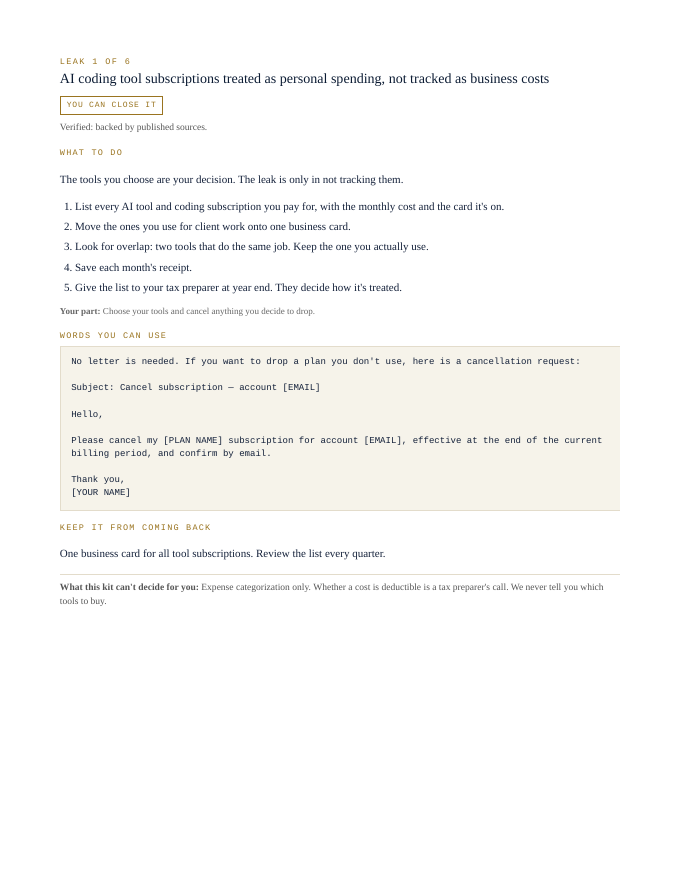
AI coding tool subscriptions treated as personal spending, not tracked as business costs
You can close itThe tools you choose are your decision. The leak is only in not tracking them.
- List every AI tool and coding subscription you pay for, with the monthly cost and the card it's on.
- Move the ones you use for client work onto one business card.
- Look for overlap: two tools that do the same job. Keep the one you actually use.
- Save each month's receipt.
- Give the list to your tax preparer at year end. They decide how it's treated.
Your part: Choose your tools and cancel anything you decide to drop.
No letter is needed. If you want to drop a plan you don't use, here is a cancellation request:

Subject: Cancel subscription — account [EMAIL]

Hello,

Please cancel my [PLAN NAME] subscription for account [EMAIL], effective at the end of the current billing period, and confirm by email.

Thank you,
[YOUR NAME]
One business card for all tool subscriptions. Review the list every quarter.
What this kit can't decide for you: Expense categorization only. Whether a cost is deductible is a tax preparer's call. We never tell you which tools to buy.
That's 1 of 6. The other 5 come the same way in the kit: steps, words to send, a habit to keep each one closed.
Opens secure checkout. Instant download after payment. 30 days to ask for a refund — refund policy · terms
What people in this work look up
When freelance and independent developers go looking for answers, they search things like “upwork fees”, “how much to charge for a website” and “developer hourly rate”. Those searches turn up forms, averages and other people's numbers. This kit starts from your own records instead: the 6 places money leaks in this work, where to look first and the words to send to close each one.
What you get for each leak
- Numbered steps to close each leak
- Your part, spelled out
- Words you can use: letters and scripts, ready to send (fill in the brackets)
- A habit that keeps each leak from coming back
- An honest line on what the kit can't decide for you
A page from the kit
Questions people ask
How much should I charge as a freelance developer?
Check your rate against the market and your own cost instead of quoting from memory. The kit shows you how.
How much do Upwork and other platforms take?
The fee comes off before the deposit. The kit has you compare your invoiced rate to what actually lands.
Should I keep billing hourly as I get faster?
Billing by the hour while getting faster means earning less for the same work. The kit shows the alternatives.
What it can't decide for you
This kit works from your own records. It doesn't give legal, tax, licensing or financial advice, and it never tells you what to charge. Where a CPA, attorney, insurer or state board makes the call, the kit says so and gets your records ready for them.
10-page PDF · instant download after payment · Code VYR-KIT-BYRON-01
Opens secure checkout. Instant download after payment. 30 days to ask for a refund — refund policy · terms
Use Jobber or Housecall Pro? Run the free leak check — it reads your job export in your browser and shows the money leaks the software doesn't flag. Nothing is uploaded.